
Guide · Home
Mesh WiFi explained
If your WiFi is strong near the router but drops out upstairs, in the extension or in the garden office, the router isn't reaching far enough. Mesh WiFi and wired access points fix that. Here's how they work, and which suits your home.
- 25+ yearsin TV and security
- Local engineerswho live where they work
- Local knowledgeof your area’s homes
Why one router isn't enough
Thick walls, long houses and garden offices leave dead spots. Compare a single router with a planned system.
Why WiFi drops out
A single router sends WiFi out in all directions, and the signal weakens with distance and with everything it passes through. Brick and block walls, floors, foil-backed insulation, mirrors, fish tanks and kitchen appliances all absorb it. Many older East Anglian homes have thick solid walls, and many newer ones have extensions or garden offices a long way from the router. The result is rooms where WiFi is weak or drops out.
What mesh WiFi is
A mesh system uses two or more units placed around the house, working together as one network with one name and password. Your phone or laptop connects to whichever unit is best, and moves between them as you walk around. The units talk to each other either wirelessly or through network cables.
Rather talk it through? Call or WhatsApp and a local engineer will give you a straight answer.
Mesh vs extenders
A traditional plug-in extender repeats the router's signal, but it often creates a separate network and typically halves the speed available through it. Devices can stay stuck to a weak signal rather than switching. Mesh systems are designed to avoid these problems, with dedicated links between units and automatic switching, so they're usually the better choice for coverage across a whole house.
Wired backhaul: the secret to fast mesh
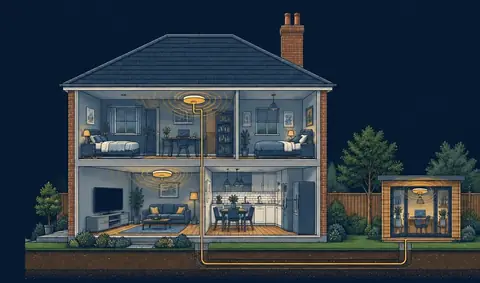
When mesh units link wirelessly, some of the WiFi capacity is used to carry traffic between them, and each wall in the way reduces the speed. Connecting each unit to the router with a network cable, called wired backhaul, removes that problem. Every unit gets the full connection, so you get the same speed upstairs, in the extension and in the garden office as next to the router.
We run network cable neatly through lofts, floors and walls to each unit, and to garden offices and outbuildings with external-grade cable.
Access points
For larger homes, offices and businesses, ceiling or wall-mounted access points connected by network cable are the most reliable option. They're designed to be wired, handle many devices well and can be placed exactly where they're needed. The result is similar to wired-backhaul mesh, with more control.
Where the units go
Placement makes a big difference. Units should be in open positions, off the floor and away from metal objects and appliances, roughly central to the areas they serve. With wireless backhaul, each unit needs to be close enough to the previous one to get a strong link, usually no more than a room or two apart. The demo above shows how coverage changes with placement.
Garden offices and outbuildings
WiFi rarely reaches far into the garden from inside the house. The reliable fix is a network cable from the house to the garden office, with a mesh unit or access point at the far end. Wireless point-to-point links are an option where cable can't be run.
Smart TVs and streaming
TVs, streaming boxes and games consoles benefit most from a wired connection. While we're running cables for mesh, adding a network point behind the TV gives a faster, more reliable connection for streaming, including Freely, which streams live TV over broadband. See our guide to Freeview, Freesat, Sky and Freely.
How we set it up
We test your WiFi in each room, look at where the router is and how the house is built, then recommend a mesh system, wired access points or a combination. We fit and cable everything, set up the network and test speeds in each room before we leave. See our home networking service.
More guides
Need a hand? See our WiFi and networking service.
FAQ
Common questions
Free advice, no obligation. Tell us your postcode and what's wrong.
Call 0800 151 2978Is mesh WiFi better than an extender?
Usually. A mesh system works as one network with one name, moves your devices to the best unit automatically, and loses less speed than a typical plug-in extender.
Will mesh WiFi make my broadband faster?
It won't increase your broadband speed, but it lets you get much more of it around the house. In rooms where the WiFi is weak, the difference can be dramatic.
Do mesh units need a cable between them?
No, they can link wirelessly. But connecting them with a network cable, called wired backhaul, gives the fastest and most reliable result, especially in large or thick-walled homes.
Picture problems or security worries? Talk to an engineer.
Call or WhatsApp for free advice and a price over the phone.